In-store payment: Cloud API
Overview
The Cloud API lets you drive a Yavin terminal over HTTPS, from any device or server: start a transaction, print or share a receipt, abort or reverse a payment. Choose it when the POS is not on the same network as the terminal, or for web-based POS systems.
At a glance
| Base URL | Production: https://api.yavin.com/api. Sandbox: https://api.sandbox.yavin.com/api |
| Authentication | API key in the Authorization: Bearer YOUR_API_KEY header |
| Naming convention | camelCase for all request payloads, except the Item object which is snake_case |
| Current version | v5 for pos/payment, v4 for all other endpoints |
| Result delivery | Asynchronous: the HTTP response only acknowledges the request, the transaction result arrives on your webhook |
Endpoints
| Endpoint | Method | Version | Purpose |
|---|---|---|---|
/v5/pos/payment | POST | v5 | Start a debit, refund, or debit_and_enrol transaction |
/v4/pos/print/ | POST | v4 | Print content on the terminal |
/v4/pos/share-receipt | POST | v4 | Share a receipt by SMS, email or print |
/v4/pos/abort/ | POST | v4 | Abort the ongoing payment |
/v4/pos/reversal | POST | v4 | Reverse a recent transaction (less than 16 hours old) |
Versions
| API version | Last updated |
|---|---|
v5 | 04/05/2026 |
v4 | 04/05/2026 |
v1 | 02/05/2022 |
Before you start
Authentication and headers. Every request must carry your company API key and declare its JSON body. You can find your API key on my.yavin.com in the API tab. Each company (physical point of sale) has its own API key.
| Header | Value | Required |
|---|---|---|
Authorization | Bearer YOUR_API_KEY | yes |
Content-Type | application/json | yes |
Omitting Content-Type: application/json returns a 400 Bad request even when the payload is valid. Set both headers on every request, including the ones that only carry a serialNumber.
Notification window. A Cloud API call asks the Yavin server to send a notification to the terminal. This notification is valid for 5 seconds: if the terminal is offline and does not receive it within that window, the action expires and is not retransmitted when the terminal reconnects. In that case no webhook is ever delivered for the returned transactionId. Always handle this case: implement a client-side timeout (125 seconds classic, 62 seconds kiosk and refunds); past this delay with no webhook, treat the payment as failed, optionally confirm via the polling fallback below, and retry with a new idempotentUuid.
Responses. Every endpoint returns a status field: ok means the request was accepted (payment endpoints) or reached the terminal (v4 endpoints), ko means it did not. Errors come as HTTP 400 with status = ko and a message. The transaction result itself arrives on your webhook as a Transaction object, documented at the end of this page along with the other shared objects.
Webhook delivery. The transaction result is delivered to your webhook when the transaction is done (including failures). Configure your webhook URL in MyYavin: Settings > API > Webhook tab (one URL per company). See Webhooks Management for the payload structure.
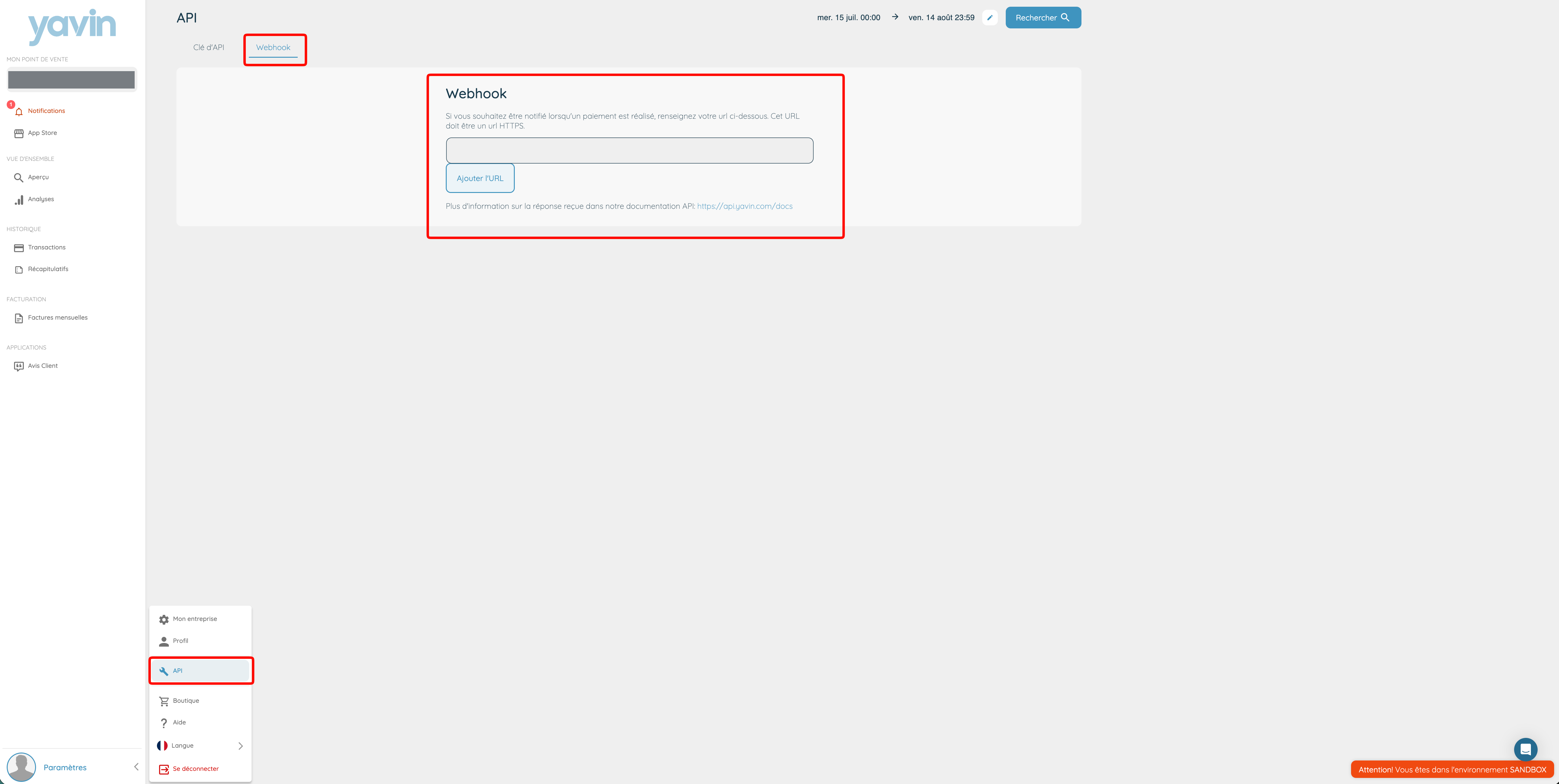
- The webhook URL must be HTTPS and must not attempt a redirection
- Yavin expects an HTTP 200 acknowledgement. On failure the webhook is retried at: 1 minute, 10 minutes, 1 hour, 8 hours later. After the retries are exhausted, the webhook is deactivated
Polling fallback. If the webhook does not arrive within the expected window (125 s classic, 62 s kiosk and refunds), poll GET https://api.yavin.com/api/v5/transaction/?transactionId={transactionId} on the Webservices API with the transactionId returned synchronously, before retrying with a new idempotentUuid.
Timeouts. A payment has a 120 second window between the moment the request is received by the terminal and a successful card read, split in two phases:
- Up to 60 seconds for optional screens (tips, reference, review). If this phase times out, the transaction is aborted.
- Up to 60 seconds for the card read itself.
Wait for the webhook up to 125 seconds for classic terminal use, 62 seconds for kiosk use (optional screens disabled) and for refunds.
Idempotency. Send an idempotentUuid on every payment request, one per payment attempt. See IdempotentUuid Management.
Currency. The currency is the one configured on the merchant profile in the Yavin database. Supported today: EUR, CHF, GBP.
curl --request POST \
  --url https://api.yavin.com/api/v5/pos/payment \
  --header "Authorization: Bearer YOUR_API_KEY" \
  --header "Content-Type: application/json" \
  --data '{
    "amount": 1000,
    "serialNumber": "782996JIS2",
    "transactionType": "debit",
    "vendor": {
      "softwareName": "MyPOS",
      "softwareVersion": "1.0"
    }
}'Start a debit transaction
https://api.yavin.com/api/v5/pos/paymentStarts a debit payment on the terminal identified by serialNumber.
Parameters
amountIntegerrequired- Amount in cents, must be positive
serialNumberStringrequired- Serial number of the target terminal. On the back of the device next to the S/N label, or in Yavin Pay under Menu > Settings > About
transactionTypeStringdefault debit- Use debit. Values are strict: any unknown value, credit included, is silently processed as a debit
idempotentUuidStringdefault autogenerated- Unique identifier of the payment attempt, see IdempotentUuid Management. Generate a new UUID for each new attempt
cartIdString- Your order number, shown in the MyYavin backoffice
customerCustomer- Customer information attached to the transaction
Show Customer parametersHide Customer parameters
customer.firstNameString- First name
customer.lastNameString- Last name
customer.emailStringcustomer.phoneString- International format starting with + (eg +33612345678)
enableGiftScreenBoolean- null (default): the terminal tips configuration applies. A non-null value overrides it for this transaction: true shows the tips screen, false skips it
giftAmountIntegerdefault 0- Tip or donation in cents, if selected on the POS side
receiptTicketReceiptTicket- Receipt content printed with the card ticket
Show ReceiptTicket parametersHide ReceiptTicket parameters
receiptTicket.dataStringrequired- Content to print
receiptTicket.formatStringdefault text- Format of the content
referenceString- Waiter or person processing the transaction
vendorVendor- Your software name and version
Show Vendor parametersHide Vendor parameters
vendor.softwareNameString- Name of the POS software
vendor.softwareVersionString- Version of the POS software
acceptedPaymentAcceptedPaymentdefault {"acceptedMediumType":"all"}- Restrict accepted card families
Show AcceptedPayment parametersHide AcceptedPayment parameters
acceptedPayment.acceptedMediumTypeStringdefault all- all, lunch_vouchers_only, bank_cards_only
checkoutExternalIdString- Merchant-unique checkout ID, required when any external order field below is sent. Use a different value for each transaction
externalTableNumberString- Table number. Only used with checkoutExternalId
externalOrderNumberString- Human-readable order number. Only used with checkoutExternalId
externalOrderIdString- Unique technical order ID from your POS. Only used with checkoutExternalId
itemsArray of Item- Detailed basket lines
Show Item parametersHide Item parameters
items.nameStringrequired- Item name
items.total_amountIntegerrequired- Total amount in cents
items.total_amount_without_taxInteger- Item total before tax
items.categoryString- Item category
items.eligible_titre_restaurantBoolean- Eligibility for meal voucher
items.free_noteString- Free text note
items.quantityInteger- Quantity
items.unit_priceInteger- Unit price in cents
items.unit_price_without_taxInteger- Unit price before tax in cents
items.taxObject- { "amount": <int>, "rate": <int> }
items.itemsArray- Nested items
Request
{
  "amount": 1000,
  "serialNumber": "782996JIS2",
  "transactionType": "debit",
  "idempotentUuid": "2f1c2e2a-6c21-4a4b-9c2b-9f6f2c8e9b51",
  "vendor": {
    "softwareName": "MyPOS",
    "softwareVersion": "1.0"
  },
  "receiptTicket": {
    "data": "This is the receipt ticket\nto print",
    "format": "text"
  },
  "customer": {
    "firstName": "John",
    "lastName": "Doe",
    "email": "john@yavin.com"
  },
  "acceptedPayment": {
    "acceptedMediumType": "all"
  },
  "checkoutExternalId": "checkout_123",
  "externalOrderId": "order_uuid_123",
  "externalOrderNumber": "A-1024",
  "externalTableNumber": "12",
  "items": [
    {
      "name": "Menu midi",
      "total_amount": 1590,
      "quantity": 1,
      "tax": { "amount": 265, "rate": 20 }
    }
  ]
}
curl -X POST 'https://api.yavin.com/api/v5/pos/payment' \
-H 'Authorization: Bearer YAVIN_API_KEY' \
-H 'Content-Type: application/json' \
-d '{
"amount": 1000,
"serialNumber": "782996JIS2",
"transactionType": "debit",
"idempotentUuid": "2f1c2e2a-6c21-4a4b-9c2b-9f6f2c8e9b51",
"vendor": {
"softwareName": "MyPOS",
"softwareVersion": "1.0"
},
"receiptTicket": {
"data": "This is the receipt ticket\nto print",
"format": "text"
},
"customer": {
"firstName": "John",
"lastName": "Doe",
"email": "john@yavin.com"
},
"acceptedPayment": {
"acceptedMediumType": "all"
},
"checkoutExternalId": "checkout_123",
"externalOrderId": "order_uuid_123",
"externalOrderNumber": "A-1024",
"externalTableNumber": "12",
"items": [
{
"name": "Menu midi",
"total_amount": 1590,
"quantity": 1,
"tax": { "amount": 265, "rate": 20 }
}
]
}'(async () => {
const response = await fetch("https://api.yavin.com/api/v5/pos/payment", {
method: "POST",
headers: {
"Content-Type": "application/json",
"Authorization": `Bearer ${process.env.YAVIN_API_KEY}`,
},
body: JSON.stringify({
"amount": 1000,
"serialNumber": "782996JIS2",
"transactionType": "debit",
"idempotentUuid": "2f1c2e2a-6c21-4a4b-9c2b-9f6f2c8e9b51",
"vendor": {
"softwareName": "MyPOS",
"softwareVersion": "1.0"
},
"receiptTicket": {
"data": "This is the receipt ticket\nto print",
"format": "text"
},
"customer": {
"firstName": "John",
"lastName": "Doe",
"email": "john@yavin.com"
},
"acceptedPayment": {
"acceptedMediumType": "all"
},
"checkoutExternalId": "checkout_123",
"externalOrderId": "order_uuid_123",
"externalOrderNumber": "A-1024",
"externalTableNumber": "12",
"items": [
{
"name": "Menu midi",
"total_amount": 1590,
"quantity": 1,
"tax": { "amount": 265, "rate": 20 }
}
]
}),
});
if (!response.ok) throw new Error(`Yavin API error ${response.status}`);
const data = await response.json();
console.log(data);
})();import os
import requests
headers = {
"Content-Type": "application/json",
"Authorization": "Bearer " + os.environ["YAVIN_API_KEY"],
}
payload = {
"amount": 1000,
"serialNumber": "782996JIS2",
"transactionType": "debit",
"idempotentUuid": "2f1c2e2a-6c21-4a4b-9c2b-9f6f2c8e9b51",
"vendor": {
"softwareName": "MyPOS",
"softwareVersion": "1.0"
},
"receiptTicket": {
"data": "This is the receipt ticket\nto print",
"format": "text"
},
"customer": {
"firstName": "John",
"lastName": "Doe",
"email": "john@yavin.com"
},
"acceptedPayment": {
"acceptedMediumType": "all"
},
"checkoutExternalId": "checkout_123",
"externalOrderId": "order_uuid_123",
"externalOrderNumber": "A-1024",
"externalTableNumber": "12",
"items": [
{
"name": "Menu midi",
"total_amount": 1590,
"quantity": 1,
"tax": { "amount": 265, "rate": 20 }
}
]
}
response = requests.post(
"https://api.yavin.com/api/v5/pos/payment",
headers=headers,
json=payload,
timeout=125,
)
response.raise_for_status()
data = response.json()Response
{
  "status": "ok",
  "transactionId": "dIuiP6NovnZS"
}Start a transaction and save the card (debit_and_enrol)
https://api.yavin.com/api/v5/pos/paymentStarts a payment and tokenizes the card in the same flow. amount can be 0 to enrol a card without charging it. The card token is delivered with the transaction result on your webhook.
Parameters
amountIntegerrequired- Amount in cents, 0 or greater
serialNumberStringrequired- Terminal serial number
transactionTypeStringrequired- Must be debit_and_enrol
idempotentUuidStringdefault autogenerated- Idempotency key
customerCustomer- Customer data
Show Customer parametersHide Customer parameters
customer.firstNameString- First name
customer.lastNameString- Last name
customer.emailStringcustomer.phoneString- International format starting with + (eg +33612345678)
vendorVendor- Software editor information
Show Vendor parametersHide Vendor parameters
vendor.softwareNameString- Name of the POS software
vendor.softwareVersionString- Version of the POS software
referenceString- Waiter or person reference
receiptTicketReceiptTicket- Optional receipt content
Show ReceiptTicket parametersHide ReceiptTicket parameters
receiptTicket.dataStringrequired- Content to print
receiptTicket.formatStringdefault text- Format of the content
receiptTicketJsonString- Additional JSON payload as string
acceptedPaymentAcceptedPaymentdefault {"acceptedMediumType":"all"}- Restrict accepted card families
Show AcceptedPayment parametersHide AcceptedPayment parameters
acceptedPayment.acceptedMediumTypeStringdefault all- all, lunch_vouchers_only, bank_cards_only
checkoutExternalId, externalOrderId, externalOrderNumber, externalTableNumberString- External order references
itemsArray of Item- Basket lines
Show Item parametersHide Item parameters
items.nameStringrequired- Item name
items.total_amountIntegerrequired- Total amount in cents
items.total_amount_without_taxInteger- Item total before tax
items.categoryString- Item category
items.eligible_titre_restaurantBoolean- Eligibility for meal voucher
items.free_noteString- Free text note
items.quantityInteger- Quantity
items.unit_priceInteger- Unit price in cents
items.unit_price_without_taxInteger- Unit price before tax in cents
items.taxObject- { "amount": <int>, "rate": <int> }
items.itemsArray- Nested items
Request
{
  "amount": 0,
  "serialNumber": "782996JIS2",
  "transactionType": "debit_and_enrol",
  "vendor": {
    "softwareName": "MyPOS",
    "softwareVersion": "1.0"
  }
}
curl -X POST 'https://api.yavin.com/api/v5/pos/payment' \
-H 'Authorization: Bearer YAVIN_API_KEY' \
-H 'Content-Type: application/json' \
-d '{
"amount": 0,
"serialNumber": "782996JIS2",
"transactionType": "debit_and_enrol",
"vendor": {
"softwareName": "MyPOS",
"softwareVersion": "1.0"
}
}'(async () => {
const response = await fetch("https://api.yavin.com/api/v5/pos/payment", {
method: "POST",
headers: {
"Content-Type": "application/json",
"Authorization": `Bearer ${process.env.YAVIN_API_KEY}`,
},
body: JSON.stringify({
"amount": 0,
"serialNumber": "782996JIS2",
"transactionType": "debit_and_enrol",
"vendor": {
"softwareName": "MyPOS",
"softwareVersion": "1.0"
}
}),
});
if (!response.ok) throw new Error(`Yavin API error ${response.status}`);
const data = await response.json();
console.log(data);
})();import os
import requests
headers = {
"Content-Type": "application/json",
"Authorization": "Bearer " + os.environ["YAVIN_API_KEY"],
}
payload = {
"amount": 0,
"serialNumber": "782996JIS2",
"transactionType": "debit_and_enrol",
"vendor": {
"softwareName": "MyPOS",
"softwareVersion": "1.0"
}
}
response = requests.post(
"https://api.yavin.com/api/v5/pos/payment",
headers=headers,
json=payload,
timeout=125,
)
response.raise_for_status()
data = response.json()Response
Same as the debit endpoint: status = ok plus a transactionId on acceptance, status = ko plus a message on failure.
Start a refund transaction
https://api.yavin.com/api/v5/pos/paymentCredits funds back to the customer card. Same endpoint, with transactionType set to refund. No optional screens, so wait for the webhook up to 62 seconds.
Parameters
transactionTypeStringrequireddefault debit- Must be set to refund. Any other value, such as credit, starts a debit
Request
{
  "amount": 1000,
  "serialNumber": "782996JIS2",
  "transactionType": "refund",
  "idempotentUuid": "8a4d1f0b-2e57-4c1a-b3d9-1c7e5f2a6d40",
  "vendor": {
    "softwareName": "MyPOS",
    "softwareVersion": "1.0"
  },
  "receiptTicket": {
    "data": "This is the receipt ticket\nto print",
    "format": "text"
  }
}
curl -X POST 'https://api.yavin.com/api/v5/pos/payment' \
-H 'Authorization: Bearer YAVIN_API_KEY' \
-H 'Content-Type: application/json' \
-d '{
"amount": 1000,
"serialNumber": "782996JIS2",
"transactionType": "refund",
"idempotentUuid": "8a4d1f0b-2e57-4c1a-b3d9-1c7e5f2a6d40",
"vendor": {
"softwareName": "MyPOS",
"softwareVersion": "1.0"
},
"receiptTicket": {
"data": "This is the receipt ticket\nto print",
"format": "text"
}
}'(async () => {
const response = await fetch("https://api.yavin.com/api/v5/pos/payment", {
method: "POST",
headers: {
"Content-Type": "application/json",
"Authorization": `Bearer ${process.env.YAVIN_API_KEY}`,
},
body: JSON.stringify({
"amount": 1000,
"serialNumber": "782996JIS2",
"transactionType": "refund",
"idempotentUuid": "8a4d1f0b-2e57-4c1a-b3d9-1c7e5f2a6d40",
"vendor": {
"softwareName": "MyPOS",
"softwareVersion": "1.0"
},
"receiptTicket": {
"data": "This is the receipt ticket\nto print",
"format": "text"
}
}),
});
if (!response.ok) throw new Error(`Yavin API error ${response.status}`);
const data = await response.json();
console.log(data);
})();import os
import requests
headers = {
"Content-Type": "application/json",
"Authorization": "Bearer " + os.environ["YAVIN_API_KEY"],
}
payload = {
"amount": 1000,
"serialNumber": "782996JIS2",
"transactionType": "refund",
"idempotentUuid": "8a4d1f0b-2e57-4c1a-b3d9-1c7e5f2a6d40",
"vendor": {
"softwareName": "MyPOS",
"softwareVersion": "1.0"
},
"receiptTicket": {
"data": "This is the receipt ticket\nto print",
"format": "text"
}
}
response = requests.post(
"https://api.yavin.com/api/v5/pos/payment",
headers=headers,
json=payload,
timeout=125,
)
response.raise_for_status()
data = response.json()Response
Same as the debit endpoint: status = ok plus a transactionId on acceptance, status = ko plus a message on failure.
Print a receipt ticket
https://api.yavin.com/api/v4/pos/print/Prints free content on the terminal (invoice, receipt, kitchen slip).
Parameters
serialNumberStringrequired- Terminal identifier
dataStringrequired- Content to print
formatStringdefault text- text or escpos
Request
{
  "serialNumber": "123456789",
  "format": "text",
  "data": "This is a ticket\nto print !"
}
curl -X POST 'https://api.yavin.com/api/v4/pos/print/' \
-H 'Authorization: Bearer YAVIN_API_KEY' \
-H 'Content-Type: application/json' \
-d '{
"serialNumber": "123456789",
"format": "text",
"data": "This is a ticket\nto print !"
}'(async () => {
const response = await fetch("https://api.yavin.com/api/v4/pos/print/", {
method: "POST",
headers: {
"Content-Type": "application/json",
"Authorization": `Bearer ${process.env.YAVIN_API_KEY}`,
},
body: JSON.stringify({
"serialNumber": "123456789",
"format": "text",
"data": "This is a ticket\nto print !"
}),
});
if (!response.ok) throw new Error(`Yavin API error ${response.status}`);
const data = await response.json();
console.log(data);
})();import os
import requests
headers = {
"Content-Type": "application/json",
"Authorization": "Bearer " + os.environ["YAVIN_API_KEY"],
}
payload = {
"serialNumber": "123456789",
"format": "text",
"data": "This is a ticket\nto print !"
}
response = requests.post(
"https://api.yavin.com/api/v4/pos/print/",
headers=headers,
json=payload,
timeout=125,
)
response.raise_for_status()
data = response.json()Response
200: status = ok (the request reached the terminal) or ko (it did not). 400: status = ko with a message.
Abort a transaction
https://api.yavin.com/api/v4/pos/abort/Aborts the ongoing payment on the terminal: every payment screen is closed and the terminal returns to its main screen.
Avoid aborting during the card reading phase: the payment gateway screen may close unexpectedly and the payment information may not be transmitted properly.
Parameters
serialNumberStringrequired- Terminal identifier
idempotentUuidString- UUID of the payment attempt to abort
Request
{
  "serialNumber": "123456789",
  "idempotentUuid": "dbcb384c-7d8d-4d2b-b367-133bfdf5c9c"
}
curl -X POST 'https://api.yavin.com/api/v4/pos/abort/' \
-H 'Authorization: Bearer YAVIN_API_KEY' \
-H 'Content-Type: application/json' \
-d '{
"serialNumber": "123456789",
"idempotentUuid": "dbcb384c-7d8d-4d2b-b367-133bfdf5c9c"
}'(async () => {
const response = await fetch("https://api.yavin.com/api/v4/pos/abort/", {
method: "POST",
headers: {
"Content-Type": "application/json",
"Authorization": `Bearer ${process.env.YAVIN_API_KEY}`,
},
body: JSON.stringify({
"serialNumber": "123456789",
"idempotentUuid": "dbcb384c-7d8d-4d2b-b367-133bfdf5c9c"
}),
});
if (!response.ok) throw new Error(`Yavin API error ${response.status}`);
const data = await response.json();
console.log(data);
})();import os
import requests
headers = {
"Content-Type": "application/json",
"Authorization": "Bearer " + os.environ["YAVIN_API_KEY"],
}
payload = {
"serialNumber": "123456789",
"idempotentUuid": "dbcb384c-7d8d-4d2b-b367-133bfdf5c9c"
}
response = requests.post(
"https://api.yavin.com/api/v4/pos/abort/",
headers=headers,
json=payload,
timeout=125,
)
response.raise_for_status()
data = response.json()Response
200: status = ok (the request reached the terminal) or ko (it did not). 400: status = ko with a message.
Reverse a transaction
https://api.yavin.com/api/v4/pos/reversalReverses a recent transaction.
Reversal conditions. The original transaction is an ok debit processed on the same terminal issuing the reversal, less than 16 hours ago (terminal time), and the reversal amount is equal to the original total amount, tip included (amount + giftAmount).
Parameters
amountIntegerrequired- Amount in cents, must equal the original total amount (amount • giftAmount)
initialTransactionIdStringrequired- Transaction to reverse
Request
{
  "amount": 1000,
  "initialTransactionId": "dIuiP6NovnZS"
}
curl -X POST 'https://api.yavin.com/api/v4/pos/reversal' \
-H 'Authorization: Bearer YAVIN_API_KEY' \
-H 'Content-Type: application/json' \
-d '{
"amount": 1000,
"initialTransactionId": "dIuiP6NovnZS"
}'(async () => {
const response = await fetch("https://api.yavin.com/api/v4/pos/reversal", {
method: "POST",
headers: {
"Content-Type": "application/json",
"Authorization": `Bearer ${process.env.YAVIN_API_KEY}`,
},
body: JSON.stringify({
"amount": 1000,
"initialTransactionId": "dIuiP6NovnZS"
}),
});
if (!response.ok) throw new Error(`Yavin API error ${response.status}`);
const data = await response.json();
console.log(data);
})();import os
import requests
headers = {
"Content-Type": "application/json",
"Authorization": "Bearer " + os.environ["YAVIN_API_KEY"],
}
payload = {
"amount": 1000,
"initialTransactionId": "dIuiP6NovnZS"
}
response = requests.post(
"https://api.yavin.com/api/v4/pos/reversal",
headers=headers,
json=payload,
timeout=125,
)
response.raise_for_status()
data = response.json()Response
200: status = ok or ko, with initialTransactionId and reversalTransactionId. 400: status = ko with a message.
The Transaction object
Delivered to your webhook once the transaction is done. See Webhooks Management for the full webhook envelope.
Attributes
statusString- ok, ko, pending
transactionIdString- Server-side identifier
localIdString- Terminal-side identifier
amountInteger- Amount in cents, excluding giftAmount. The customer is debited the sum of amount and giftAmount (equal to total_amount in the webhook payload)
giftAmountInteger- Tip or donation in cents
currencyCodeString- ISO 4217 code
transactionTypeString- eg debit
createdAtString- Creation date in the Yavin database
appVersionString- Yavin Pay app version
serialNumberString- Terminal identifier
clientTicket / companyTicketString- Client and merchant tickets
panString- Masked card PAN
ticketUrlString- URL of the digital client ticket
paymentApplicationString- AMEX, ANCV, CONECS_CONTACT, CONECS_CONTACTLESS, EMV_CONTACT, EMV_CONTACTLESS, EMV_MOTO, EMV_PAYMENT_LINK, RESTOFLASH, DISCOVER, CUP
schemeString- Acceptance network (eg VISA)
issuerString- Card issuer
referenceString- Waiter or person who performed the transaction
checkoutExternalId, externalTableNumber, externalOrderNumber, externalOrderIdString- External order references
{
  "status": "ok",
  "transactionId": "dIuiP6NovnZS",
  "localId": "1042",
  "amount": 1000,
  "giftAmount": 0,
  "currencyCode": "EUR",
  "transactionType": "debit",
  "createdAt": "2026-08-14T10:22:31",
  "appVersion": "3.2.8",
  "serialNumber": "782996JIS2",
  "paymentApplication": "EMV_CONTACTLESS",
  "scheme": "CB",
  "issuer": "VISA",
  "pan": "424242******4242",
  "ticketUrl": "https://t.yavin.com/dIuiP6NovnZS",
  "reference": "Luke",
  "clientTicket": "...",
  "companyTicket": "...",
  "checkoutExternalId": "checkout_123",
  "externalTableNumber": "12",
  "externalOrderNumber": "A-1024",
  "externalOrderId": "order_uuid_123"
}The Customer object
Optional on the payment endpoint. Customer information attached to the transaction. It is not used by /share-receipt, where the terminal always prompts for the recipient.
Attributes
firstNameString- First name
lastNameString- Last name
emailStringphoneString- International format starting with + (eg +33612345678)
{
  "customer": {
    "firstName": "John",
    "lastName": "Doe",
    "phone": "+33612345678",
    "email": "john@yavin.com"
  }
}The ReceiptTicket object
Content printed alongside the card ticket on the payment endpoint, or shared on /share-receipt.
Attributes
dataStringrequired- Content to print
formatStringdefault text- Format of the content
{
  "receiptTicket": {
    "data": "Receipt ticket here to print if needed",
    "format": "text"
  }
}The Vendor object
Identifies your POS software. Optional everywhere, but strongly recommended: it is what lets our support team trace an issue back to a specific integration and version.
Attributes
softwareNameString- Name of the POS software
softwareVersionString- Version of the POS software
{
  "vendor": {
    "softwareName": "MyPOS",
    "softwareVersion": "1.0"
  }
}The AcceptedPayment object
Restricts the card families the terminal will accept for this transaction. Useful for a kiosk that must refuse meal vouchers, for example.
Attributes
acceptedMediumTypeStringdefault all- all, lunch_vouchers_only, bank_cards_only
{
  "acceptedPayment": {
    "acceptedMediumType": "bank_cards_only"
  }
}The Item object
Basket lines sent with a payment. Available on v5 pos/payment only. Items drive the meal-voucher eligibility rules, so send them whenever the merchant accepts meal vouchers.
Item fields are in snake_case, unlike the rest of the payload.
Attributes
nameStringrequired- Item name
total_amountIntegerrequired- Total amount in cents
total_amount_without_taxInteger- Item total before tax
categoryString- Item category
eligible_titre_restaurantBoolean- Eligibility for meal voucher
free_noteString- Free text note
quantityInteger- Quantity
unit_priceInteger- Unit price in cents
unit_price_without_taxInteger- Unit price before tax in cents
taxObject- { "amount": <int>, "rate": <int> }
itemsArray- Nested items
{
  "items": [
    {
      "name": "Menu midi",
      "total_amount": 1590,
      "total_amount_without_tax": 1325,
      "quantity": 1,
      "unit_price": 1590,
      "category": "food",
      "eligible_titre_restaurant": true,
      "tax": { "amount": 265, "rate": 20 }
    }
  ]
}